
SA302: The Complete Guide to Your HMRC Tax Calculation in 2026
Imagine you’ve finally found your dream home, but your mortgage lender suddenly demands a document you’ve never heard of just as the 31 October 2026 paper deadline approaches. It’s a stressful scenario facing many of the UK’s self-employed professionals who find themselves scrambling for an sa302 while a property deal hangs in the balance. We understand that HMRC terminology often feels like a foreign language; it’s natural to feel anxious when official records look different from your internal spreadsheets or when a deadline’s looming.
Our expert guide is designed to go beyond the books and relieve you of these complications by showing you exactly how to master your tax documentation. You’ll learn how to access your calculation immediately, understand why it’s distinct from a tax year overview, and ensure it meets the strict criteria of your lender. We’ll walk you through the transition to Making Tax Digital for those earning over £50,000, providing you with the calm competence needed to focus solely and truly on your personal and professional goals.
Key Takeaways
- Learn how to identify your official income summary and total tax liability for the 2026 tax year to ensure your records are accurate.
- Discover the exact steps to navigate the HMRC dashboard and download your sa302 calculation with just a click of your finger.
- Understand the vital difference between a tax calculation and a tax year overview so you can provide mortgage lenders with exactly what they need.
- Avoid common pitfalls like the “72-hour rule” and resolve discrepancies between your accounting software and the HMRC portal.
- Explore how a proactive approach to tax planning goes beyond the books to protect your business and simplify your mortgage application process.
Understanding the SA302: Your Official HMRC Tax Calculation Explained
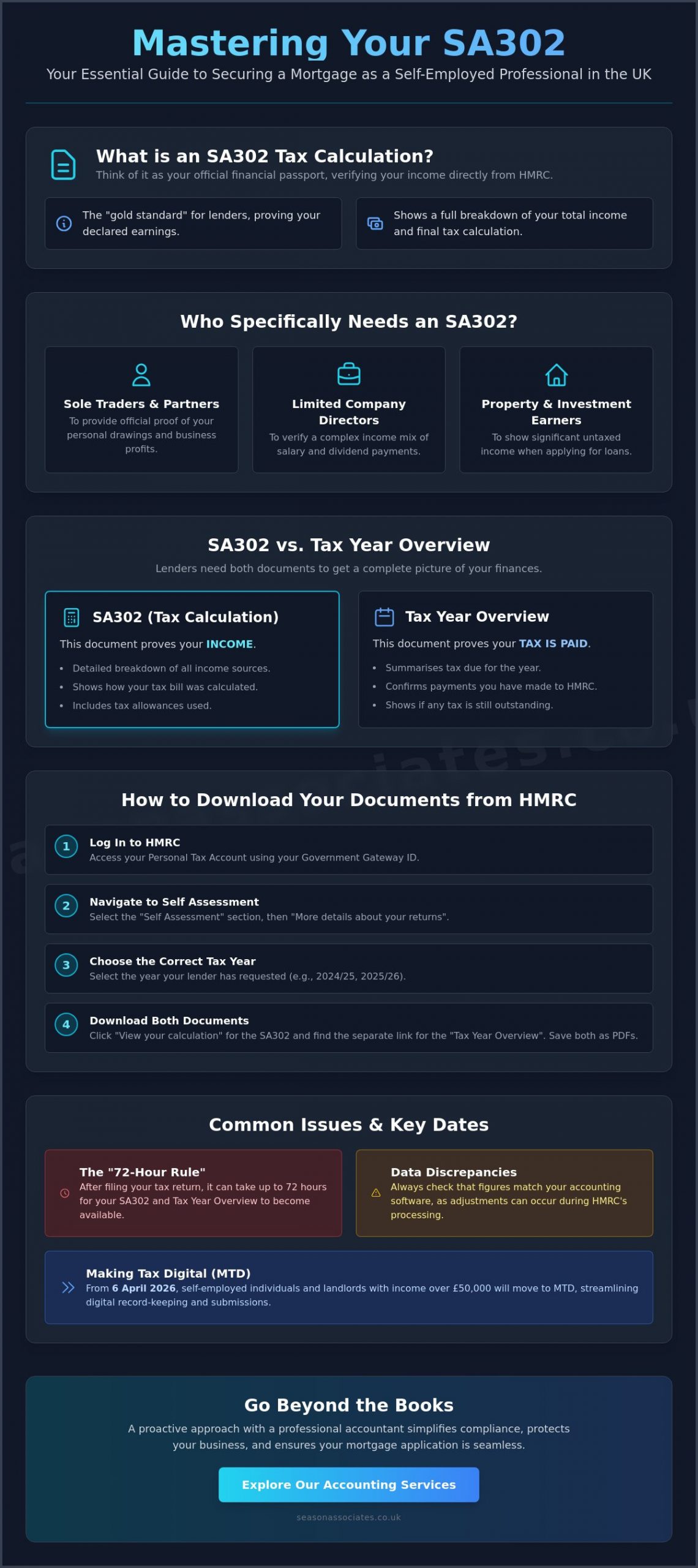
What exactly is an sa302? Think of it as your business’s financial passport. It’s the official summary of all income you’ve reported to HMRC through your Self Assessment tax return. This document doesn’t just show what you earned; it breaks down your total income, your personal allowance (which remains at £12,570 for the 2025-2026 year), and the final tax calculation. Needing this document is a completely normal milestone in the life of a growing business. It represents the moment your hard work transitions from internal numbers into a verified financial legacy.
Whilst other documents like internal spreadsheets or bank statements are useful for your own records, the sa302 is the “gold standard” for external bodies. Lenders often reject self-certified figures because they lack the official stamp of government verification. This document proves that the numbers you’re presenting to a bank are the exact same numbers you’ve committed to on your tax record. It relieves you of the complication of trying to explain your income through unverified means, providing a clear and reliable shield against any doubt from underwriters.
To help you visualise how to secure this document for your next big step, watch this helpful video:
Who Specifically Needs an SA302?
If you’re a sole trader or a partner in a firm, you’ll need this document to prove your personal drawings. It’s equally vital for limited company directors who often receive a complex combination of a small salary and larger dividends. Even if you aren’t traditionally self-employed, you might need one if you have significant untaxed income from property or investments and are seeking a loan. It provides the clarity needed to show you’re a reliable borrower with a transparent financial history.
Why Mortgages and Lenders Demand This Document
Why do banks insist on this specific piece of paper? It’s about trust and verification. A lender needs to see that the income you claim to have matches what you told the taxman. They use these figures to calculate affordability ratios, ensuring you can realistically manage repayments on a British property purchase. Because lenders typically ask for the last two to three years of records, it gives them a multi-year view of your financial stability and behaviour. It proves your business isn’t just a “flash in the pan” but a flourishing enterprise capable of supporting your long-term goals.
How to Access Your SA302 Documents for 2026
Securing your financial records shouldn’t feel like a hurdle, even with the recent shifts in UK tax administration. Since 6 April 2026, self-employed individuals and landlords with an income over £50,000 have moved into the Making Tax Digital (MTD) framework. This means your interaction with HMRC is now more streamlined than ever before. Whether you’re a high-earner or fall below the current MTD threshold, you can access your sa302 with just a click of your finger once your return is processed.
When you’re in the middle of a mortgage application, speed is essential. Most lenders now require digital copies; saving your calculation as a PDF is a vital step for a smooth submission. We recommend checking your data thoroughly before sending it off. Our “Beyond the Books” approach means we don’t just pull reports; we look for tax planning opportunities that could help your business flourish in the long term. If you need a partner to ensure your filings are accurate, you can explore our accounting services to find a plan that fits your growth.
Using the HMRC Online Portal
If you file directly through the government gateway, the process is methodical. First, log into your HMRC Personal Tax Account using your Government Gateway ID. Navigate to the “Self Assessment” section and select “More details about your returns”. It’s crucial to select the correct tax year, such as 2024/25 or 2025/26, to match your lender’s request. Once you’ve selected the year, look for the “View your calculation” link. From here, you can view and print the full summary. To prove your income effectively, always choose the “Print your full calculation” option, as this provides the detailed breakdown lenders demand.
Retrieving SA302 Data via Accounting Software
For those using cloud systems like Xero or QuickBooks, the document is often called a “Tax Computation”. This is a professional equivalent to the HMRC-generated sa302 and is widely accepted by major UK banks. Your accountant can provide this directly from their software, which often looks cleaner and more structured than a basic browser printout. However, you must account for the 72-hour synchronisation delay. HMRC typically takes up to three days to process a submission before the official record is updated in their systems. Ensuring your software is fully synchronised prevents any embarrassing discrepancies when a lender performs their final checks. This proactive monitoring is part of being a diligent guardian of your financial reputation.
SA302 vs Tax Year Overview: What Do Lenders Actually Need?
Are you feeling overwhelmed by the list of documents your mortgage broker has requested? It’s a common frustration amongst entrepreneurs. Whilst the sa302 provides the detailed breakdown of your income and personal allowances, it only tells half the story. A lender needs to be certain that the tax calculated on that document was actually settled with HMRC. This is where the Tax Year Overview enters the frame. Think of the calculation as the invoice and the overview as the receipt. One shows the liability; the other proves the payment behaviour.
To secure a smooth approval in 2026, you must provide both. The calculation details your total income and the specific rates applied, such as the 20% basic rate or the 40% higher rate for profits above £50,270. In contrast, the overview focuses on the financial transaction. It lists the total tax due for the year and the payments you’ve made, including any payments on account made by the 31 July 2027 deadline. If there’s a discrepancy or an outstanding balance, a lender might view it as a red flag, potentially stalling your application at the final hurdle.
We recommend preparing a “mortgage pack” containing the last three years of both documents. This proactive approach relieves you of the complication of last-minute requests. It shows your lender that you are organised and detail-oriented, qualities that build significant trust during the underwriting process. By presenting a complete financial picture, you allow the bank to focus on your affordability rather than questioning your data.
The Tax Year Overview Explained
This document acts as the ultimate confirmation of your standing with the taxman. It confirms the exact amount of tax paid and highlights any outstanding balance. Lenders use this to ensure you aren’t in significant arrears, which could impact your ability to meet mortgage repayments. It provides a transparent look at your payment history, acting as the essential “receipt” for the figures presented in your sa302. By having both ready, you project an image of calm competence and financial reliability.
Why Lenders Request Multiple Years
Why do banks look so far back? It’s because self-employed income rarely follows a perfectly straight line. Lenders typically request the last three years of both documents to identify a steady or growing trend in your profits. If you had a year with lower profits due to business investment or a temporary market dip, don’t panic. A lower figure isn’t an automatic rejection. This is where our role as a diligent guardian becomes invaluable. We can provide the necessary context to a lender, explaining fluctuations and demonstrating your business’s long-term potential. Preparing a comprehensive pack with three years of data ensures your application is robust and ready for scrutiny.
Common Issues Whilst Retrieving Your Proof of Earnings
Have you ever logged into the HMRC portal only to find your latest calculation missing? It’s a sinking feeling, particularly when your mortgage lender is chasing you for proof of earnings. These technical glitches or processing delays don’t mean your tax return is wrong, but they can certainly cause unnecessary anxiety. At Season Associates, we act as your diligent guardian, ensuring that these digital hiccups don’t derail your property ambitions or financial goals. We understand that HMRC terminology can be confusing, and we’re here to provide the calm competence you need to resolve these issues quickly.
Sometimes the problem is simply the counterintuitive design of the HMRC website. If you can’t find the “Print” or “Save” button, you aren’t alone. You often need to navigate through several layers, starting with “View your calculation” and then selecting “Print your full calculation” to generate the document in a format that lenders will accept. Additionally, HMRC frequently schedules system maintenance during weekends or just before major deadlines like 31 January 2027. If you’re facing a discrepancy you can’t explain, you can contact our professional accounting team to reconcile your records and ensure your submission is accurate.
The 72-Hour Synchronisation Delay
One of the most frequent sources of frustration is the lag between filing a return and the system generating the official sa302. When you or your accountant submits your data, it doesn’t appear in your personal tax account instantly. HMRC’s servers typically take up to 72 hours to process the information and update your records. Don’t panic if the document is missing immediately after filing. To avoid stress during a mortgage application, we recommend filing your returns at least ten days before you anticipate needing the loan documentation. This proactive planning relieves you of the complication of waiting on government processing times whilst a property deal hangs in the balance.
Discrepancies in Figures
Why does your Xero or QuickBooks “Tax Computation” sometimes show a different figure than the HMRC portal? This is a common issue that often confuses business owners. Commercial software calculates your liability based on real-time information, but the HMRC version of the sa302 might include previous year adjustments, specific rounding rules, or even late payment penalties that haven’t been pulled back into your software yet. These minor differences can be enough to make a lender pause their assessment. Our role is to step in and liaise with HMRC on your behalf, explaining these fluctuations to your lender and ensuring your financial stability is clearly demonstrated.
Beyond the Books: How Professional Accounting Simplifies Your Compliance
Are you tired of the last-minute scramble for tax papers every time a financial opportunity arises? At Season Associates, we believe that accounting should be a catalyst for your personal and professional freedom, not a source of dread. By positioning ourselves as the “Diligent Guardian” of your financial records, we ensure your sa302 is always accurate, verified, and ready for lenders at a moment’s notice. This proactive approach moves you away from the frantic search for documents and towards a state of calm competence where your finances are a foundation for growth rather than a hurdle to overcome.
Transitioning from simply “getting a document” to building a flourishing business requires a partner who looks at the bigger picture. Our fixed-fee monthly retainers provide ongoing peace of mind, ensuring that your compliance is handled with precision throughout the year. This transparency means there are no hidden charges when you need to retrieve your 2026 records for a mortgage or a business loan. You can access the information you need with just a click of your finger, allowing you to move forward with confidence.
Proactive Tax Planning
We monitor your records closely throughout the year to ensure your sa302 reflects your true financial potential. This isn’t just about ticking boxes; it’s about using real-time information to avoid those unpleasant surprises when the tax year ends on 5 April 2026. By identifying tax-saving opportunities early, we ensure all allowable expenses are claimed. This legally minimises your tax return whilst maintaining the strong income profile that British lenders look for. It’s a strategic balance that helps your business flourish whilst keeping you fully compliant with HMRC regulations.
A Reassuring Partner for HMRC Matters
Navigating the HMRC portal can be a labyrinthine task that takes you away from your core business activities. We relieve you of all the complication by handling the digital paperwork and statutory filings on your behalf. Whether it’s managing the transition to Making Tax Digital for income over £50,000 or resolving a technical discrepancy, we act as your reliable shield. Our goal is to provide the steady support you need to focus solely and truly on your goals. With Season Associates by your side, the complexities of tax calculations become a seamless part of your success story rather than a source of anxiety.
Secure Your Financial Future Today
Are you ready to take the next step in your property journey with absolute confidence? Mastering your documentation is about more than just satisfying a lender’s checklist. It’s about building a robust financial reputation that serves you for years to come. By ensuring your sa302 and Tax Year Overview are perfectly aligned, you eliminate the friction that often stalls mortgage applications.
With over 10 years of HMRC compliance expertise, Season Associates acts as your diligent guardian. We provide accurate, reliable tax planning for UK sole traders through a transparent fixed-fee monthly model with no hidden charges. This approach relieves you of the complication of portal navigation and synchronisation delays, ensuring your records are available with just a click of your finger.
Get your tax returns organised and SA302 ready with Season Associates today. Let us handle the technicalities so you can focus solely and truly on your goals. Your flourishing business deserves a partner who goes beyond the books to protect your potential. You’ve worked hard to build your income; let’s make sure your documentation reflects that success clearly and accurately.
Frequently Asked Questions
How long does it take for an SA302 to be available after filing?
It typically takes up to 72 hours for your document to appear in your HMRC online account after you’ve successfully submitted your return. This delay occurs because the system requires time to process the calculation and update your digital record. If you’ve used commercial software, the synchronisation with the HMRC portal follows this same three day window.
Can I get an SA302 if I am not self-employed but have rental income?
Yes, you can access an sa302 if you report rental income through the Self Assessment system. Any individual who submits a personal tax return, including landlords and investors, will have a calculation generated once their submission is processed. It serves as official proof of your total taxable income regardless of the source.
What should I do if my mortgage lender won’t accept my printed SA302?
You should first check that you’ve printed the “full” calculation rather than just the summary page. Most lenders also require the Tax Year Overview to verify that the tax due was actually settled. If your lender remains unsatisfied with a home-printed version, your accountant can provide a certified copy from their professional software which carries additional authority.
Is an SA302 the same as a P60 or a P45?
No, these documents serve entirely different purposes within the UK tax system. A P60 or P45 details income from employment where tax is deducted at source via PAYE. The sa302 is specific to the Self Assessment system and provides a holistic view of all your income streams, including self-employment, dividends, and property profits.
How many years of SA302 documents do I usually need for a mortgage?
Most UK mortgage lenders require the last 2 or 3 years of calculations to assess your affordability accurately. Providing a multi year history allows underwriters to see a stable or growing trend in your business profits. This consistency builds significant trust and helps you secure the borrowing capacity needed for your property purchase.
Can my accountant download my SA302 for me directly?
Yes, your accountant can download your tax calculation directly through their HMRC agent portal or professional accounting software like Xero. This relieves you of the complication of navigating the government gateway yourself. They can ensure the document is correctly formatted and matches the records held by the taxman before you submit it to any third parties.
What happens if there is an error on my SA302 tax calculation?
You must amend your Self Assessment tax return to correct any inaccuracies in the reported figures. Once the amendment is submitted, HMRC will process the new data and generate an updated calculation within the standard 72 hour window. It’s vital to ensure these figures are 100% accurate before they are used for mortgage applications or compliance checks.
Is the SA302 being replaced by Making Tax Digital in 2026?
The document itself isn’t being retired, but the way your data is submitted is changing for many. From 6 April 2026, those with self-employed or property income over £50,000 must follow Making Tax Digital (MTD) rules. Your calculation will be generated based on these digital quarterly updates, but it remains the official “gold standard” proof of earnings for lenders.